What Is an SSL Certificate Chain? Root and Intermediate
By MinniHost Guides Editorial Team Review by MinniHost Guides Editorial Team Last checked Posted Topic: SSL & HTTPS
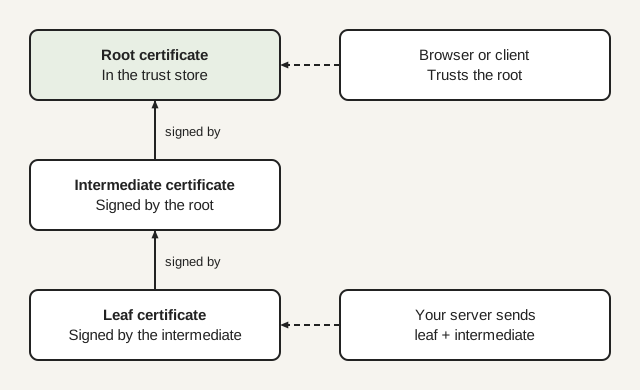
An SSL certificate chain is the ordered list of certificates that links your site's certificate, through one or more intermediate certificates, to a root certificate that browsers already trust. Your server should send its own certificate first and then the intermediates. The root is normally left out, because the client already holds it in its trust store.

Part of our guide: What Is an SSL Certificate? How HTTPS Works
General information, not professional security or financial advice. Check your host’s and certificate authority’s current documentation; steps differ by provider.
A certificate chain is how a browser decides to trust a certificate it has never seen. Your site’s certificate is signed by an intermediate, the intermediate is signed by a root, and the root is already in the browser’s trust store. This page supports our guide to what an SSL certificate is and explains the three links, what your server must send and the errors that appear when a link is missing.
What are the leaf, intermediate and root?
The chain has three kinds of certificate, and each one vouches for the next.
- Leaf (end-entity) certificate: the one issued for your domain. Your server presents it first.
- Intermediate certificate: a certificate authority (CA) certificate that signed the leaf. There can be one or several.
- Root certificate: a self-signed certificate at the top. RFC 5280 says self-signed certificates are used to convey a public key that begins certification paths.
A certificate can sign others only if it is marked as a CA. RFC 5280 says that when the basic constraints cA boolean is not asserted, the public key must not be used to verify certificate signatures. This is why an ordinary website certificate cannot be used to mint more certificates.
Why do browsers trust a root and not my certificate directly?
A client cannot check a stranger’s signature without something it already trusts. Operating systems and browsers ship a list of root certificates, the trust store. Your certificate is accepted because following the signatures upward ends at one of those roots.
In general, roots are kept out of daily use and intermediates do the signing, which limits the damage if one is compromised and lets a CA replace an intermediate without touching the root. That arrangement is why you hold three certificates in a chain and not one.
What must my server send?
Your server should send the leaf certificate first, followed by the intermediates, and normally not the root. RFC 8446 requires the sender’s certificate to be the first entry, says each following certificate should directly certify the one before it, and allows a certificate that specifies a trust anchor to be omitted when peers are known to have it.
In practice the CA gives you a “full chain” or “bundle” file in this order. In cPanel the install form has separate fields for the certificate (CRT), the private key (KEY) and an optional CA bundle (CABUNDLE), per the cPanel documentation. Paste the bundle your CA supplied into the CA bundle field. Many ACME clients write a fullchain file that already has the leaf plus intermediates.
Why do chains change over time?
Intermediates and roots have their own expiry dates and are replaced on a schedule, and sometimes one root is cross-signed by another so older devices keep working. Let’s Encrypt’s page on chains of trust, read on 17 November 2026, shows this: ISRG Root X1 is trusted until 2030-06-04 and cross-signs other roots, and the active intermediates YE1, YE2, YR1 and YR2 are valid until 2028-09-02. The page lists further backup intermediates that are not currently issued from.
The same page describes a trade-off. Chains ending at ISRG Root X1 are larger but work with the oldest clients, while shorter chains need newer clients. It also warns that backup intermediates “may be used at any time, without warning”. The lesson is to install what your CA or ACME client gives you at each renewal rather than saving an old intermediate file and reusing it. Expiry of the leaf matters just as much; see renewing an SSL certificate, and for how validation levels differ, SSL certificate types.
Which errors point to a chain problem?
Two OpenSSL messages account for most chain trouble, and they mean different things.
| Message | What OpenSSL says it means | Usual cause |
|---|---|---|
| unable to get local issuer certificate | The issuer certificate of an untrusted certificate cannot be found | Server did not send the intermediate, or the client lacks the root |
| self-signed certificate in certificate chain | A chain was built but no suitable trust anchor is in the trust store | Private root not trusted, or a proxy replacing the certificate |
Our guide to fixing “unable to get local issuer certificate” separates server-side from client-side causes.
How do I inspect a chain?
Paste the PEM certificates into our in-browser certificate decoder, or use your browser’s certificate viewer, or OpenSSL. The s_client command with -connect host:443 -servername host -showcerts prints the certificate list the server sent in the order sent. OpenSSL’s documentation notes that this is the raw list, not a verified chain, so it shows what your server actually sends.
Look at the order, the subject and issuer of each entry, and the dates. The issuer of the first certificate should match the subject of the second, and so on.
How do I fix a missing intermediate?
Install the full chain on the server and reload it. Get the bundle from your CA, or let your ACME client write the full chain file, then point the server at it and reload. Check again with a command-line tool such as s_client, because a browser may hide the problem.
What not to do
- Do not turn off certificate verification in curl, scripts or applications to get past the error.
- Do not paste your private key into a form or checker to “test the chain”. Only public certificates are needed.
- Do not rely on one browser loading the site as proof that the chain is complete.
Sources re-opened and compared with this text by the MinniHost Guides team on 2026-11-17. The team holds no engineering licence or vendor certification.
Your questions answered
What is a certificate chain?
A certificate chain is the sequence of certificates a client follows to decide whether to trust a site. It starts with the site's own certificate, passes through one or more intermediate certificates, and ends at a root certificate in the client's trust store. Each certificate is signed by the next one up, so trust passes down the chain.
What is an intermediate certificate?
An intermediate certificate is a certificate authority certificate that sits between the root and your site's certificate. The root signs the intermediate, and the intermediate signs your certificate. Using intermediates lets the root stay out of daily use. Your server must send the intermediates, because browsers and tools do not reliably have them.
Should I install the root certificate on my server?
Normally no. RFC 8446 allows a certificate that specifies a trust anchor to be left out of the chain when clients are known to have it, and clients already hold the roots they trust. Send your certificate and the intermediates your certificate authority supplies. Adding the root only makes each handshake larger.
Why does my site work in a browser but fail in curl?
The usual cause is a missing intermediate certificate. Clients differ in how they treat an incomplete chain, and command-line tools and libraries are often stricter than a browser. A quick test is to connect with the OpenSSL s_client command and show the certificates the server sends. If the intermediate is absent, install the full chain file.
What does self-signed certificate in certificate chain mean?
OpenSSL gives this message when the chain was built from the certificates it had but no suitable trust anchor was found in the trust store. Either the site uses its own private root that your client does not trust, or something between you and the site, such as a filtering proxy, is substituting its own certificate.
Where this comes from
- RFC 8446: The Transport Layer Security (TLS) Protocol Version 1.3, section 4.4.2 (rfc-editor.org)
- RFC 5280: Internet X.509 Public Key Infrastructure Certificate and CRL Profile (rfc-editor.org)
- OpenSSL documentation: X509_STORE_CTX_get_error (docs.openssl.org)
- OpenSSL documentation: openssl-s_client (docs.openssl.org)
- cPanel documentation: SSL/TLS (docs.cpanel.net)
- Let's Encrypt: Chains of Trust (letsencrypt.org)
- What Is an SSL Certificate? How HTTPS Works
An SSL certificate links a website's public key to its domain name so browsers can encrypt traffic and check who they reach. How it works, what it proves
- How to Get an SSL Certificate for Your Website
Get an SSL certificate: check your host, use automatic issuance or buy one, install it, force HTTPS and fix mixed content, with WordPress notes.
- Let's Encrypt: Free SSL Certificates Explained
Let's Encrypt issues free, automated, domain-validated SSL certificates. How ACME issuance and renewal work, the limits, and how free compares with paid.
- How to Renew an SSL Certificate Before It Expires
Renew an SSL certificate before it expires: check the end date, fix failed automatic renewals, renew a purchased one and plan for shorter lifetimes.
- SSL Certificate Types: DV, OV, EV, Wildcard, SAN
SSL certificate types differ in validation (DV, OV, EV) and coverage (single, wildcard, multi-domain SAN). Compare them and see which suits a small site.
- Fix: "Unable to Get Local Issuer Certificate"
The error "unable to get local issuer certificate" means a client cannot find a certificate's signer. Learn which side is at fault and fix it safely.