VPS vs Shared Hosting: Which Fits a Small Site?
By MinniHost Guides Editorial Team Posted Topic: Hosting
Shared hosting suits most small brochure sites, blogs and low-traffic WordPress installs because the provider runs the server for you. A VPS gives you your own virtual server and more control, but you take on updates, security and troubleshooting. Choose by how much server work you are willing to own, not by the label.

Part of our guide: What Is Web Hosting?
Shared hosting and a virtual private server (VPS) are two ways to run the same site, and the real difference is who looks after the server. This guide sits under our web hosting overview; read what shared hosting is and what VPS hosting is first if either term is new.
Short answer by site type
Choose shared hosting for a brochure site, a blog, a portfolio or a small WordPress site with modest traffic. Choose a VPS when you run software that a shared plan will not allow, need reserved resources, or want control over the server configuration and are willing to maintain it.
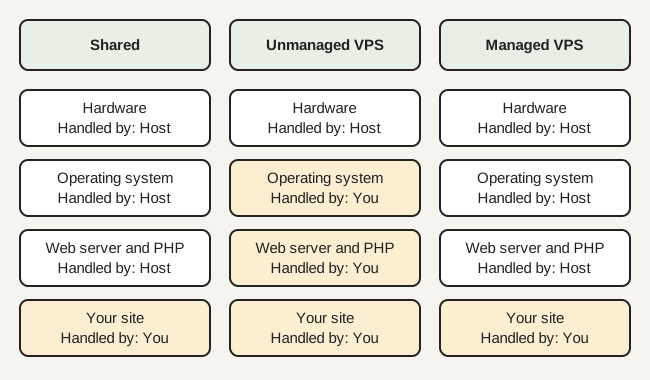
A third option sits between them. Managed WordPress hosting puts the server work with the provider but limits what you can change.
Side-by-side comparison
The comparison table on this page lists the main differences. Two rows matter most for a small site: who applies updates, and how much technical skill the plan assumes. Plan names vary, so read the provider’s own description of what is included before you compare.
Performance: what really changes
On shared hosting, accounts share a server, so a busy neighbour can affect you, and the plan limits CPU, memory, processes or storage. On a VPS you get a reserved allocation, which makes performance more predictable, but a poorly tuned VPS can still be slower than a well-run shared plan.
Most small-site slowness comes from the site, not the plan: large images, too many plugins, no caching. Fix those first. A bigger server does not repair a heavy page.
Security and responsibility split
On a VPS you own the server’s security. NIST SP 800-123 describes the essential activities for securing and maintaining network-facing servers over time, and it is a useful list of what an unmanaged VPS adds to your week: patching, access control, logging and backups.
Software versions are part of that. WordPress.org currently recommends PHP 8.3 or greater, and the PHP project lists security support for branch 8.3 until 31 December 2027, so you will need to plan upgrades. On shared hosting the provider normally controls the PHP version choices offered to you; confirm which ones in the plan documentation.
Whichever type you pick, WordPress.org recommends a host that supports HTTPS. See what an SSL certificate is for what that involves.
Cost shape: what to compare
This guide quotes no prices, because a price is only meaningful with a date and a source. Compare the shape instead:
- The introductory price, the length of the introductory term and the renewal price.
- Backups, a control panel licence, email and SSL if they are add-ons.
- For a VPS, a management fee or your own time.
- One-time fees and the term you must pay up front.
Enter the quotes you actually receive into a multi-year cost comparison to compare them over one, three and five years.
Which should you choose?
- Brochure site, blog or portfolio: shared hosting.
- Small WordPress site, low to moderate traffic: shared hosting, or managed WordPress hosting if you want updates handled.
- Store or booking site that needs predictable resources: a VPS, preferably managed, or a plan type the software vendor documents.
- Custom application or software that needs root access: a VPS.
- You do not want to maintain a server at all: shared or managed hosting.
Use the neutral checklist for choosing a web host once you know the type. This site ranks no providers.
Moving from one to the other
Changing type is a site move, so plan it as one: back up, copy, test, then switch. The nine-step process is in moving a site step by step.
Sources re-opened and compared with this text by the MinniHost Guides team on 2026-11-17. MinniHost Guides is an independent editorial site. We do not sell hosting.
| Question | Shared hosting | VPS hosting |
|---|---|---|
| Who sets up the server software? | The provider, usually through a control panel | You, unless you buy a managed VPS |
| Isolation from other customers | Lower: many accounts share one server's resources | Higher: a reserved slice of CPU and memory |
| Who applies operating-system and security updates? | Typically the provider (check the terms) | You, unless the plan is managed |
| Technical skill needed | Low | Moderate to high (command line, firewall, backups) |
| Cost shape | Lower base cost, fixed limits and add-ons | Higher base cost, plus your time or a management fee |
| Scaling | Move up a plan or move to another type | Resize the plan or add resources, often with a restart |
A small brochure site, blog or modest WordPress install belongs on shared hosting unless you have a specific need for custom software or guaranteed resources. Move to a VPS when you can name the limit you are hitting and you are ready to maintain a server.
Your questions answered
Is VPS better than shared hosting?
A VPS is not better in every case; it is different. It gives you reserved resources and more control, which helps when you run custom software or outgrow a shared plan. In exchange you handle updates, security and backups unless the plan is managed. For a small brochure site or blog, shared hosting is usually the simpler and sufficient choice.
Can a small business site run fine on shared hosting?
Yes, a small business site with modest traffic, such as a brochure site, a blog or a simple WordPress install, normally runs well on shared hosting. Check the plan's stated resource limits, backup terms and PHP versions before you commit, and make sure it meets the current WordPress requirements published on WordPress.org.
How much traffic needs a VPS?
There is no single traffic number, because page weight, caching and plugins change the load. Move up when you can point to a measured problem, such as repeated resource-limit warnings or slow pages under normal use. Use the storage and bandwidth estimator to turn visits and page size into a rough monthly figure first.
Is VPS hosting harder to manage?
Yes, an unmanaged VPS is harder because you are responsible for the operating system, the web server, PHP, the database, a firewall and backups. NIST frames server security as a continuing maintenance activity. A managed VPS shifts some of that work to the provider, but you should confirm exactly which tasks are covered.
Does a VPS cost more than shared hosting?
Usually the base price of a VPS is higher, but compare the whole cost shape rather than a headline price: renewal terms, backups, management fees, a control panel licence and your own time. Put the quotes you receive into the cost calculator to see a multi-year total on equal terms.
Where this comes from
- WordPress.org: Requirements (wordpress.org)
- PHP: Supported Versions (php.net)
- NIST SP 800-123: Guide to General Server Security (csrc.nist.gov)
- What Is Web Hosting?
Web hosting explained in plain English: what a host provides, how shared, VPS, cloud and managed hosting differ, and what a small site needs.
- WordPress Hosting Explained: Types and Requirements
WordPress hosting explained: what WordPress needs from a server, how shared, VPS, managed and cloud options differ, and WordPress.org vs WordPress.com.
- How to Host a WordPress Website: Step by Step
How to host a WordPress website: what you need, choosing a hosting type, installing WordPress, turning on HTTPS, backups and first-launch troubleshooting.
- How to Choose a Web Host: A Neutral Checklist
A neutral checklist for choosing a web host: what your site needs, versions, backups, security, support and exit terms, with no rankings or affiliates.
- Managed WordPress Hosting: What You Get
What managed WordPress hosting usually covers, what it does not, common restrictions and questions to ask, compared with shared and VPS hosting.
- Self-Hosted WordPress vs WordPress.com Hosting
Self-hosted WordPress (WordPress.org software) versus WordPress.com: who hosts, who updates, plugin limits, ownership and what a host must provide.